Over years of working with companies of all sizes, we’ve noticed a pattern: the hardest questions about cloud infrastructure don’t come from engineers — they come from business owners and CFOs. That makes sense. Their accountability isn’t measured in technical metrics, but in budgets, continuity, and strategic risk. Below are the seven questions we hear most often, with thorough answers to each.
Most calculations where the cloud “loses” are based on a flawed comparison: they take the cost of a single virtual machine and compare it to a single physical server. That’s not a comparison — it’s the illusion of one.
1. The cost structures are fundamentally different
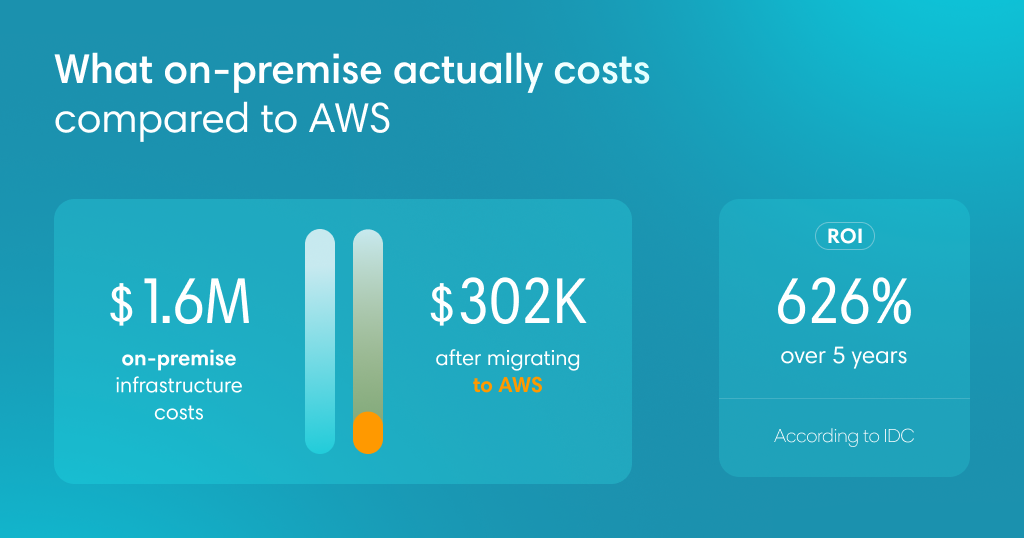
On-premise is a model built on large upfront investments: you buy equipment that will be obsolete in 3–5 years and lock capital into hardware. AWS is an operational model. You pay for actual consumption — no upfront costs, no risk of a server that never pays for itself. The money that used to go toward buying hardware can now fund product development or getting new services to market.
2. What never makes it into the comparison tables
The real cost of on-premise includes line items that routinely fall out of calculations: electricity and cooling (up to 40% of a data center budget), server room rental, round-the-clock administrator salaries, and licenses for operating systems and system software. In the cloud, all of this is already built into the hourly cost of resources.
3. An idle resource still costs you money
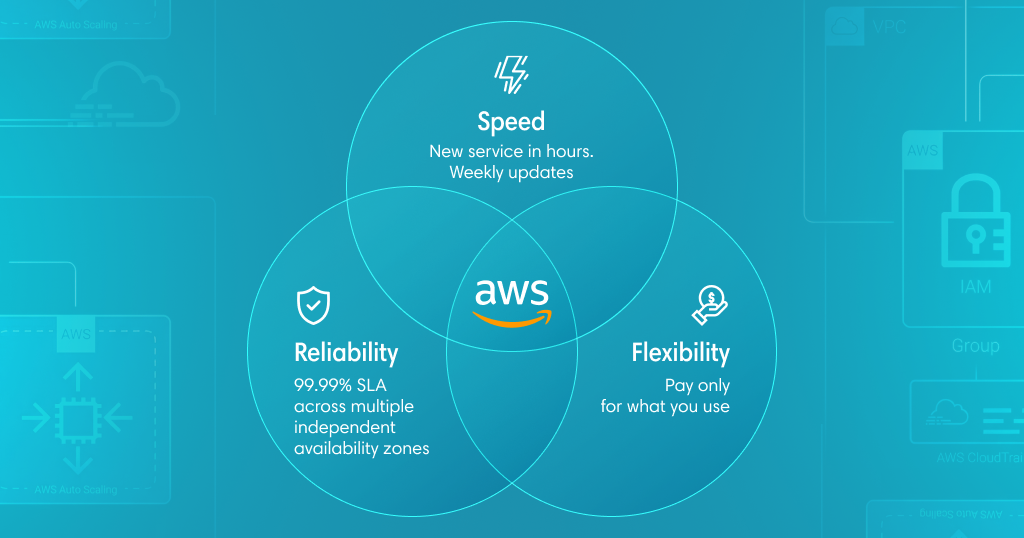
A local server consumes electricity and needs maintenance regardless of how loaded it is. AWS Auto Scaling automatically adjusts capacity to match current demand — the system scales down to a minimum overnight, then expands during peak hours. You don’t pay for resources that aren’t working.
4. Managed services as a staffing alternative
Instead of your own database with a dedicated administrator — Amazon RDS. Instead of a server to run code — AWS Lambda. Patches, backups, replication — the cloud handles all of it. You pay for the service, but save considerably more on specialist headcount and cut time to market.
Optimization tools that simply don’t exist in a data center
There’s a concept in security called Security by Obscurity. Having a server physically in your office creates a sense of control — but it doesn’t guarantee real protection.
1. Data ownership is legally defined
Under the AWS Customer Agreement, the customer is the sole owner of their data. AWS acts as a processor or custodian — with no right to access the content. Violating this principle would mean reputational and financial damage on a scale incompatible with continuing as a business.
2. Technical control: the keys stay with you
The Bring Your Own Key (BYOK) model lets you encrypt data using AWS KMS or the CloudHSM hardware module, keeping the keys under your own control. Even if someone gains physical access to a disk — without your key, all they’ll see is encrypted data that’s unreadable without decryption.
3. The shared responsibility model
AWS secures the foundation: physical protection, hardware operation, network infrastructure. Your responsibility covers access management, application-layer configuration, and data protection within the system. In your own data center, you’re responsible for everything — from a leaking roof to OS kernel vulnerabilities. In AWS, your focus is exclusively on securing your application.
How to reduce dependency on a single provider:
→ Multi-Cloud
Critical backups or part of the infrastructure in Google Cloud or Azure
→ Infrastructure as Code (Terraform)
The entire infrastructure is described in code; moving to another region takes hours, not months
→ Offsite backup
Pushing critical data to an independent S3-compatible service
→ Going Open Source
Kubernetes (EKS) and PostgreSQL instead of proprietary services, which simplifies future migration
Technically — yes, you can. But AWS isn’t just a cloud platform with open access. It’s a commercial ecosystem with specific support programs, closed funding mechanisms, and partner terms that aren’t available to direct customers.
1. Local billing and proper documentation
AWS invoices in dollars on behalf of a foreign legal entity. For accounting, that means currency controls, non-standard document formats, and VAT complications. Through Elcore Cloud, you receive an invoice in local currency under a standard contract — no paperwork headaches.
2. Access to closed funding programs
As an authorized AWS partner, Elcore Cloud gives clients access to programs unavailable through direct connection:
MAP — Migration Acceleration Program
Grants or AWS credits worth thousands of dollars to cover infrastructure costs during migration. You move to the cloud at no cost during the transition period.
POC — Proof of Concept
A dedicated budget for testing a solution before production launch. AWS absorbs the risk of the idea, not your budget.
3. Architectural optimization
For any task in AWS, there are multiple implementation scenarios. An experienced partner picks the right one — accounting for your actual architecture, budget constraints, and performance requirements. The result: up to 30% savings on monthly AWS costs.
4. Priority escalation
When you contact AWS Support directly, you’re one of millions of customers in a queue. Authorized partners have dedicated communication channels with Partner Solutions Architects inside AWS. If you’re in a critical situation, escalation happens significantly faster.
5. Cost auditing
As your partner, Elcore Cloud audits current cloud spend: if you’re spending $10,000 a month and the bill drops to $7,000 after an audit — the partnership pays for itself.
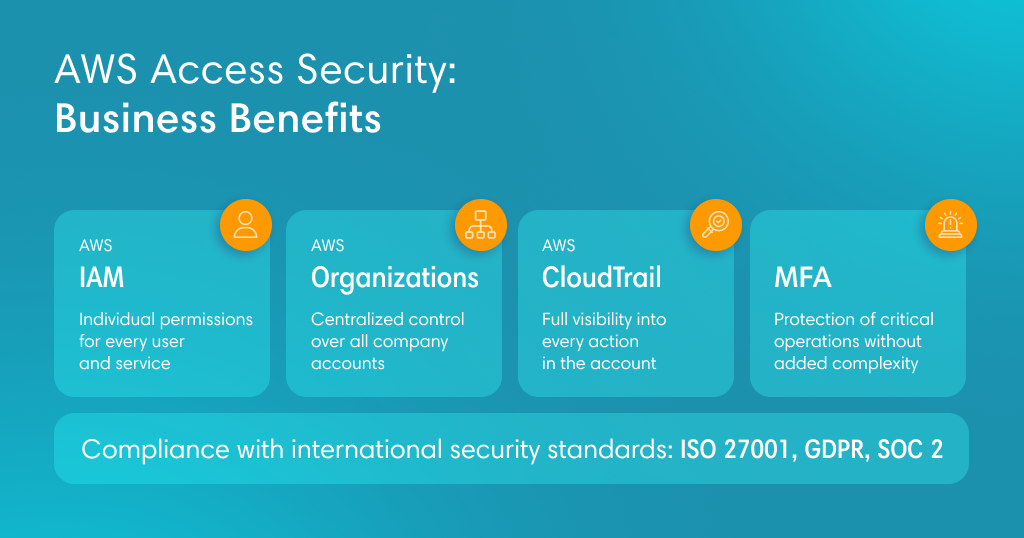
AWS access architecture is built on the principle of least privilege: the partner sees exactly what you’ve allowed — and nothing more.
1. IAM Roles: you set the boundaries
The partner doesn’t receive credentials to your account. Instead, IAM Roles are used — roles with a clearly defined list of permitted actions. You can grant access exclusively for reading billing data, and the partner will technically be unable to view database contents, files in S3, or change network settings. Access can be revoked in a single click at any time.
2. An important distinction: billing is not data
The partner sees a number: “$500 a month, RDS service.” What’s inside the database — customer names, transactions, configurations — stays entirely within your control.
3.A full audit of every action — CloudTrail
In the cloud, there’s no acting without a trace. AWS CloudTrail records every action by every user: who, when, from which IP address, and exactly what they did. If a partner simply views a list of services — it’s already in the log. You can configure instant alerts for any access to sensitive resources.
4. Three-layer legal protection
NDA with significant financial penalties for disclosure of confidential information
Contract with AWS: a partner that abuses access loses their status — which means the end of their business
Local contract with liability under applicable law
If that’s the figure you got, there’s almost certainly one of four common mistakes in the calculation.
Mistake 1: Lift-and-shift without optimization
Taking a server with 128 GB RAM and 32 cores, loaded at 10%, finding an identical instance in AWS and running it 24/7 — means paying for nothing. A physical server is bought with a three-year buffer built in. In AWS, you start with the minimum you actually need and enable Auto Scaling. If the application needs 2 cores at night and 32 during the day — you pay for average consumption, not the peak.
Mistake 2: On-Demand as the baseline price
On-Demand is the most expensive AWS pricing tier — the equivalent of a hotel room booked on the spot. For stable workloads, Savings Plans or Reserved Instances offer discounts of up to 72%. The “×10” figure immediately becomes “×3” — without changing a single line of architecture.
Local data center |
AWS (accurate calculation) |
• Buy with years of buffer |
• Pay for current consumption |
Mistake 3: Only counting EC2, ignoring services
RDS looks expensive — but its price includes administrator work, licenses, automatic backups across three availability zones, and failover. Add up the salaries of two engineers maintaining a local cluster 24/7 — and the picture changes.
Mistake 4: The cost of inflexibility
Launching a new project for a week of testing in a data center: order a server, wait a month, rack it — then leave it idle if the idea didn’t work out. In AWS: deployed in an hour, spent $5, deleted. The cost of experimentation simply can’t be accurately captured in a comparison spreadsheet.
The hidden cost of storage reliability
S3 stores data across at least three physically separate data centers by default. To replicate that level of reliability locally, you’d need infrastructure in three different locations — which automatically triples the real cost of on-premise. That line item is simply absent from most comparison calculations.
“If it ain’t broke, don’t fix it” is a reasonable rule for stable systems. But moving to the cloud isn’t about replacing hardware. It’s about changing how you respond to business challenges. Here are four situations where “it’s working fine” turns into a trap.
1. Unexpected traffic spikes
A major press mention or marketing campaign — and traffic grows 50× in an hour. Local infrastructure goes down. New servers: at least four weeks for procurement and installation. By then, your customers are already with a competitor. In AWS, infrastructure scales automatically in two minutes, and you only pay for the hours the spike lasts.
2. Speed as a competitive advantage
A developer needs a new test database.
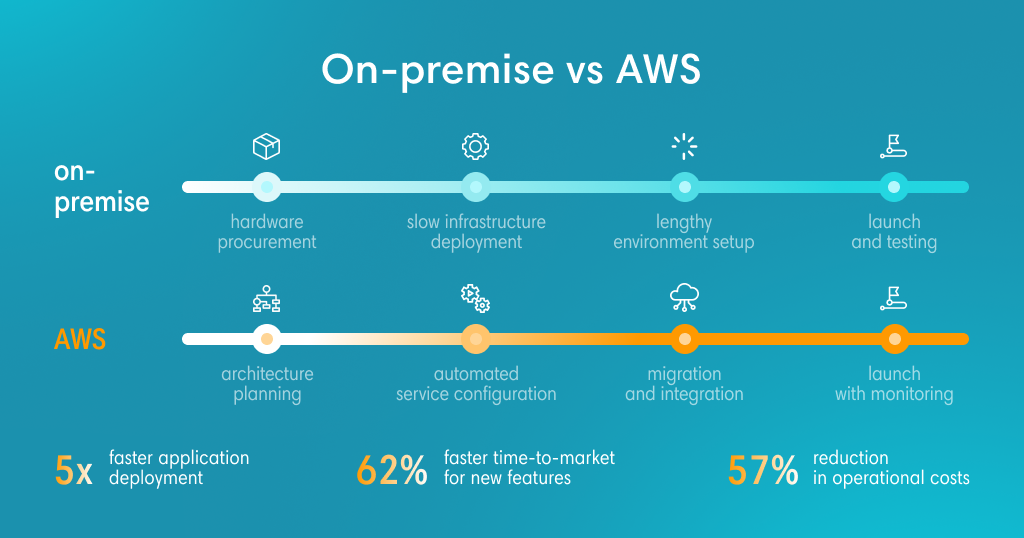
In a data center: ticket to admins → resource allocation → OS setup → three days.
In AWS: a few clicks → five minutes.
Companies operating in the cloud ship updates every week. Those staying on-premise — once every two months. Over a year, that gap in time to market becomes critical.
3. The disaster that seems impossible
Fire, theft, contractor error, disk array failure. In a data center, recovery depends on how recent the backup is — and it may have been on the same equipment that failed. In AWS, data is distributed by default across physically isolated availability zones. Even a complete failure of one building doesn’t bring down the service. Cloud architecture is insurance against scenarios whose cost is incompatible with business survival.
4. Access to AI/ML without buying GPUs
Training your own neural network on local infrastructure means GPU servers costing tens of thousands of dollars — sitting idle most of the time. In AWS, you rent the compute you need for two hours, train the model, and shut it off. Amazon Bedrock, SageMaker, and other services make AI tools accessible without capital investment in specialized hardware.
Caring about business continuity is a sign of maturity, not paranoia. Let’s look at what actually protects your data and your access to it.
1. Legal guarantees, not goodwill
As a publicly listed US corporation, Amazon operates under international law and sanctions regulation. Any restrictions are possible only on the basis of legal decisions — not commercial or political expediency. Customer rights are protected by an official agreement that clearly defines the terms under which service is provided and terminated.
2. Architecture with no single point of failure
The right answer to any risk isn’t choosing one provider — it’s building a resilient architecture:
• Geographic diversification: data and compute distributed across multiple regions with a guaranteed SLA of 99.99% — well above what local hardware can offer.
• Independent redundancy: critical data stored under the “3-2-1” rule (three copies, two different media types, one offsite), including immutable backups protected from ransomware encryption.
• Infrastructure as code: a full system description in code (Terraform) lets you reproduce the entire environment in another region or with another provider within hours.
3. EU jurisdiction as an additional layer of protection
Hosting data in EU-jurisdiction regions provides one of the world’s strictest frameworks for data owner rights. Data physically does not leave the chosen region without your explicit consent. Compliance with ISO 27001 and SOC 2 removes the need to prove system reliability to partners and regulators.
The question is never whether risks exist — they exist in every model. The question is how manageable those risks are. A properly built cloud architecture turns uncertainty from a threat into a controlled variable.
Get concrete numbers for your specific case
Moving to the cloud is a strategic decision that requires analysis before any technical specification: what architecture fits your business, where cost optimization is possible, how to structure access controls, how to ensure resilience.
Elcore Cloud is an authorized AWS partner. Our clients get access to exclusive funding programs — grants and AWS credits through MAP (Migration Acceleration Program) and POC.
If you’re evaluating whether a migration makes sense or want to understand the real cost in your specific situation — submit a consultation request. We’ll analyze your current infrastructure and give you concrete numbers, not general estimates.